Modern EDR platforms go beyond signature-based detection and elevate endpoint security through behavioral analysis. However, the abuse of digitally signed, trusted processes — particularly the vmtoolsd component of VMware Tools — remains a blind spot for many EDRs. In this article, we examine Guest Operations abuse carried out via vmtoolsd, the telemetry it leaves behind in SentinelOne DeepVisibility, and the custom detection rule I authored.
EDR solutions, thanks to their behavioral analysis focus, have recently come to the fore over antivirus solutions in securing endpoint devices.
Modern EDR platforms do not only detect known malware through signature-based methods; they also collect and analyze processes that are spawned, behaviors observed on the system, file system activities, and user behaviors as a whole. With these multi-factor behavioral detection capabilities, EDRs take measures against threat actors in cyber attacks.
The signature-based methods of EDR solutions can today be bypassed through the abuse of trusted processes. Digitally signed and well-known processes in particular are seen as attractive by cyber attackers. This scenario is generally observed in the abuse of Windows files, but it also appears in software frequently used in enterprise environments such as VMware Tools.
In this article I will examine the abuse scenario of the vmtoolsd process and which logs this scenario leaves behind in the SentinelOne EDR solution.
VMware Tools Case

vmtoolsd is a signed and trusted process that runs within Guest Operations and is the core component of VMware Tools. Operations initiated by the Guest OS pass through vmtoolsd, which sits between the hypervisor and VMware Tools, rather than through a remote access channel arriving over the network. In these operations, protocols such as PsExec or RDP are not used. Operations started through vmtoolsd have become a blind spot for EDRs because these primary protocols are not used and the operations remain limited to endpoint telemetry.
Why EDR Platforms Miss This Activity
EDR may automatically treat signed and trusted processes as low risk.
EDR cannot correlate activities inside a VM with their effects on other endpoint devices.
EDR cannot map activities inside a VM to traditional attack topologies because protocols such as SMB, WinRM, RDP, or PsExec are not used.
How Modern EDR Detection Should Approach This
EDR should not view signed processes as low risk and must perform behavioral analysis.
The relationships between parent and child processes should be analyzed in more detail, and unusual activities should be approached with suspicion.
It is not enough to inspect only the running processes; the commands executed under each process must also be analyzed in detail.
Trusted Process Abuse Detection from the SentinelOne Perspective
In the remainder of this article, within the scope of a controlled test, I would like to share the telemetry data and detection rule I identified on the SentinelOne platform for activity carried out with the vmtoolsd.exe parent process using the Guest OS.
Within the test scenario, unexpected processes (powershell) were spawned after the vmtoolsd.exe process, unusual commands were executed, and file deletion operations were performed via a child process.
In order to detect the relevant activities, the query src.process.parent.name = 'vmtoolsd.exe' AND src.process.cmdline contains ('powershell', 'cmd', 'cscript') was executed in the SentinelOne Deepvisibilty section.
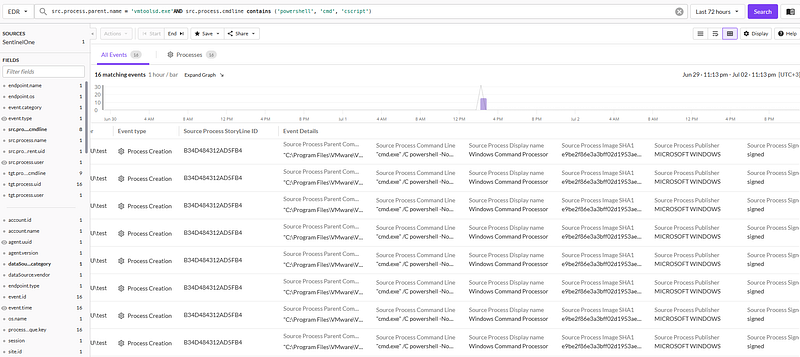
The purpose of this query is to filter processes whose parent process is vmtoolsd.exe and whose command line uses PowerShell, CMD, or Windows Script Host (cscript). Such activities are not typical within the normal functions of VMware Tools.
As can be seen from the output of the query above, a parent process considered signed and trusted, the subsequent unusual child process, and the commands executed by that child process were logged on the SentinelOne platform. However, these activities were not treated as an anomaly and were not triggered as an alert.
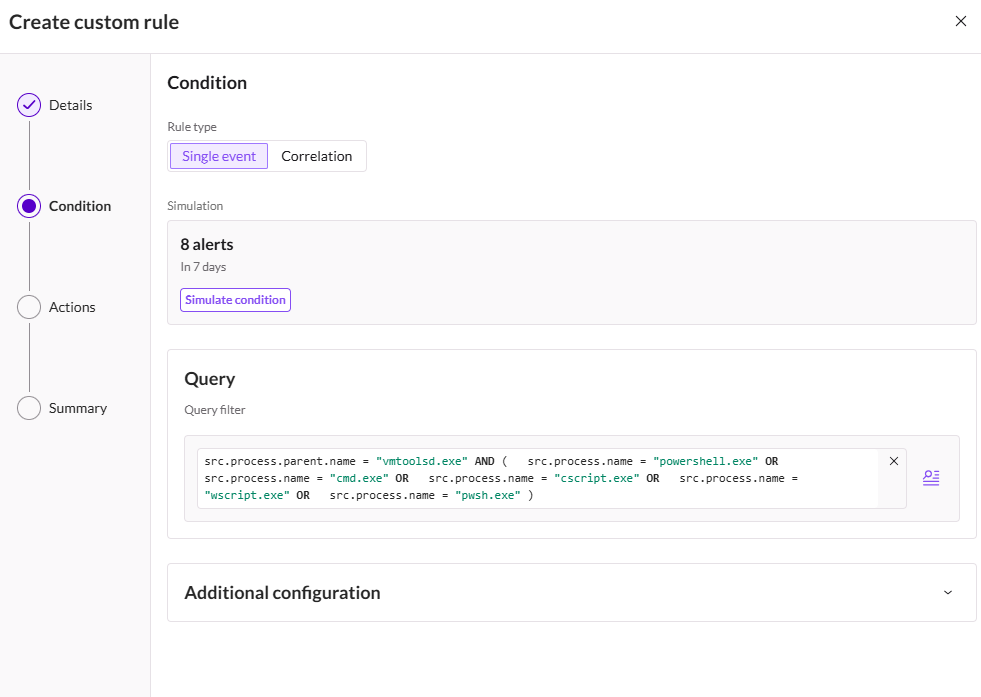
I would like to share the rule I created on SentinelOne for this case:
This rule was created to detect activities initiated with the vmtoolsd.exe parent process whose child processes include powershell, cmd, cscript, and similar processes, and to raise an alert. This rule will trigger an alert on SentinelOne when the vmtoolsd.exe process operates outside normal user behavior — particularly in covert command execution scenarios — and will provide visibility at an early stage.
On the SentinelOne platform, a simulation feature covering the last one week is offered during the rule authoring stage.
Leveraging the Rule Simulation feature provided by the SentinelOne platform, the detection rule I developed was put through a validation process against the last week of telemetry data. This made it possible to analyze the rule's effectiveness against past activity before promoting it to the production environment, to evaluate the potential alert output, and to perform preliminary validation aimed at optimizing the False Positive rate.
As a result of the simulation performed, the rule was found to produce 8 alerts over the last week of activity. These results show that the rule is able to successfully detect the targeted behaviors; a screenshot of the corresponding simulation is provided below.
VMware Tools Case Recommendations
vCenter and ESXi management access must be protected with multi-factor authentication (MFA), should as far as possible be provided over out-of-band management, and administrator accounts should be monitored through Privileged Access Management (PAM) solutions with session records retained.
The Guest Operations privilege should only be granted to users and service accounts that genuinely need it, its use should be audited regularly, and alerting mechanisms should be established for unusual use.
On the Guest OS, application control mechanisms such as PowerShell Constrained Language Mode, AppLocker, or Windows Defender Application Control (WDAC) should be enabled to restrict the uncontrolled execution of applications such as PowerShell.
Visibility into PowerShell activity should be increased.
On the EDR side, existing exclusions for processes started under vmtoolsd.exe should be reviewed again.
On the EDR side, behavioral detection rules should be defined — particularly targeting the parent-child processes covered in this test — and controls should be maintained through regular threat hunting activities.
Melike TÜNCAZ
L1/L2 MDR Analyst
This article is based on the results of a controlled test and Rule Simulation carried out in a real SentinelOne environment.