On 21 October 2026, the PHP team released an emergency update fixing two critical flaws that target the interpreter itself and allow remote code execution without authentication. Word of the flaws leaked before the official announcement, and the first attack attempts were seen before the patch was even out. In this post we bring together what happened, who is at risk and the steps that need to be taken today.
A week that started with a leak
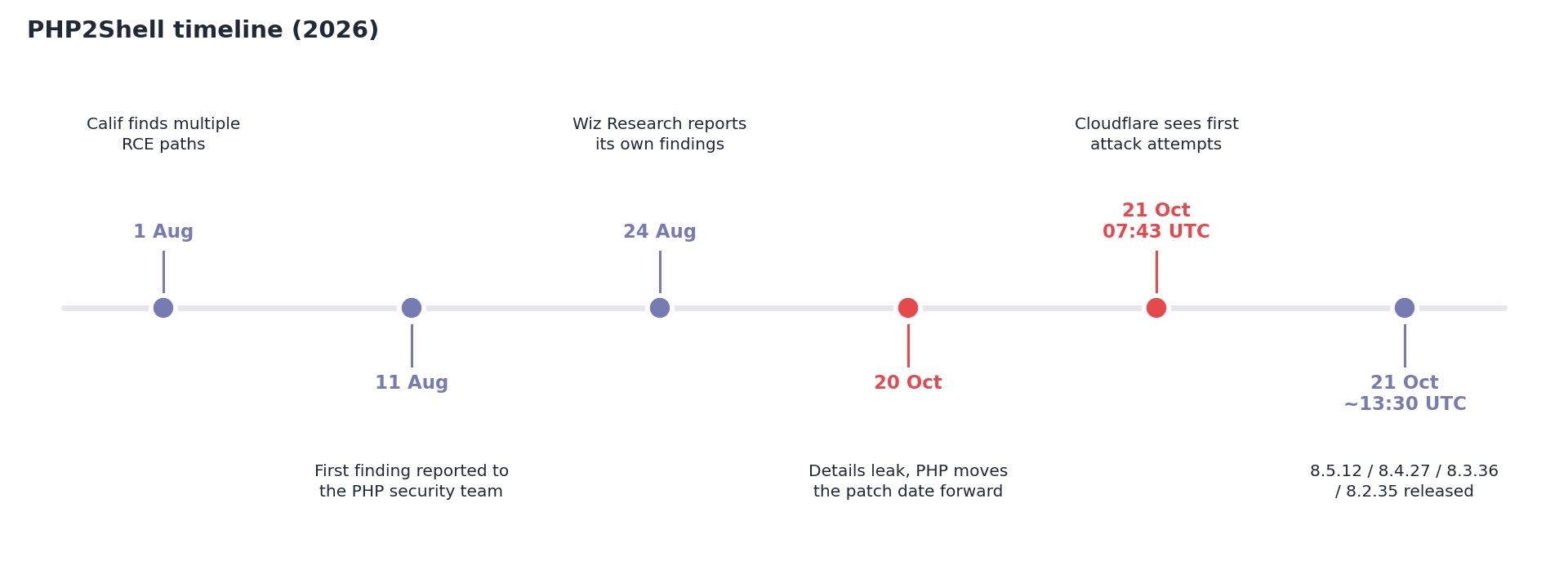
On 20 October, a short post on the Hacker News forum claimed that two remote code execution flaws in PHP, each with a CVSS score of 10.0, would be announced within a few days. The author admitted they had no concrete evidence, and the post was soon removed. But screenshots were already circulating. Security firm watchTowr then confirmed that the information was real and that the flaws were under embargo.
The leaked information included two CVE numbers (CVE-2026-109618 and CVE-2026-109619), a score and a date, but no technical detail on how the flaws work. The embargo was originally due to lift on Thursday, 22 October. That same evening at 19:33 UTC, the PHP security team sent a pre-announcement to the php.announce list and brought the update forward by a day, scheduling it for 21 October at 14:00 UTC (17:00 Turkey time). The notice said both flaws were critical, scoring 9.2 on the CVSS v4.0 scale, and that the patch could ship even earlier if details became public or active exploitation was observed. It is worth stressing that the 10.0 score in the leak was not PHP's own assessment.
The update arrived on 21 October. According to Huntress, the releases were out shortly before the scheduled time: PHP 8.5.12, 8.4.27, 8.3.36 and 8.2.35. A fix for the 8.6 branch, still in development, was also released with 8.6.0 RC4.
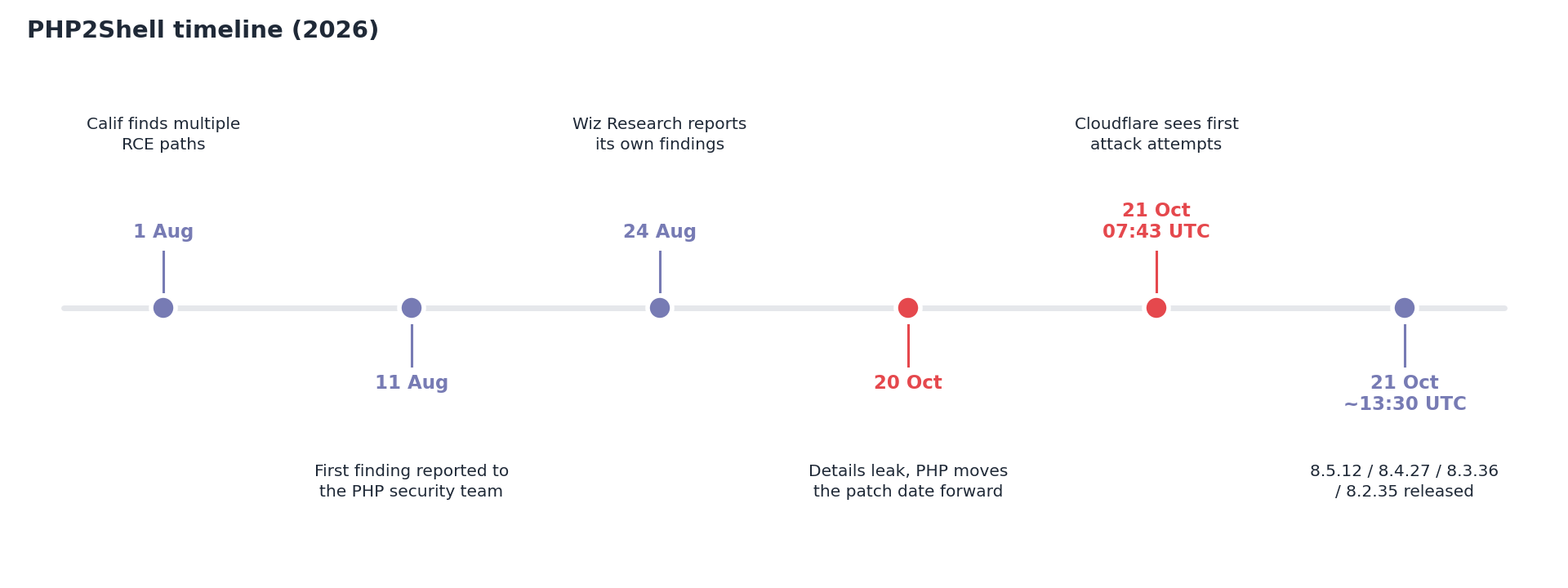
The flaws were found independently by two teams. Ryan Austin of Calif identified multiple RCE paths on 1 August and reported them to PHP on 11 August. Wiz Research reported its own findings on 24 August. Wiz says it relied heavily on AI models during discovery and exploit development, which made it possible to chain bugs that had sat in the code for more than a decade much faster. OpenAI also took part in the coordinated disclosure.
What exactly are the flaws?
Both flaws live not in applications written in PHP but directly in the interpreter's memory management. What they have in common is fatal errors that occur while a request is being processed. In particular, when the memory limit is exceeded (out of memory), PHP is cut off midway, before it has fully prepared or cleaned up its internal data. This half-finished state is then used as if it were valid by the next request handled by the same worker process.
CVE-2026-109618, corruption caused by memory exhaustion. According to PHP's official description, an out-of-memory error can stop execution while request-related internal data is only partially prepared. The cleanup performed at the end of the request treats this invalid data as valid, and that opens the path to code execution. The PHP team confirmed full RCE over HTTP, without authentication, on Apache mod_php with default limits.
CVE-2026-109619, stale global state. Internal state belonging to one request can live on after the memory behind it has been freed. The next request handled by the same worker can access it before normal startup resets that state. The result is an unauthenticated heap use-after-free, memory disclosure and code execution with the worker's privileges.
Wiz Research's technical write-up sharpens the picture. The researchers found similar use-after-free and type confusion bugs in the unserializer used by the mechanism that tracks file upload progress (session upload progress), in the fatal error backtrace and in OPcache's shared memory. One of them stands out: after a specific multipart request, the contents of freed memory can be encoded into the PHPSESSID cookie returned by the server and sent back to the attacker. This happens even if the application never calls session_start(). In other words, before even reaching code execution, an attacker can read passwords, session keys, API tokens and even TLS private keys left over from other users' requests.
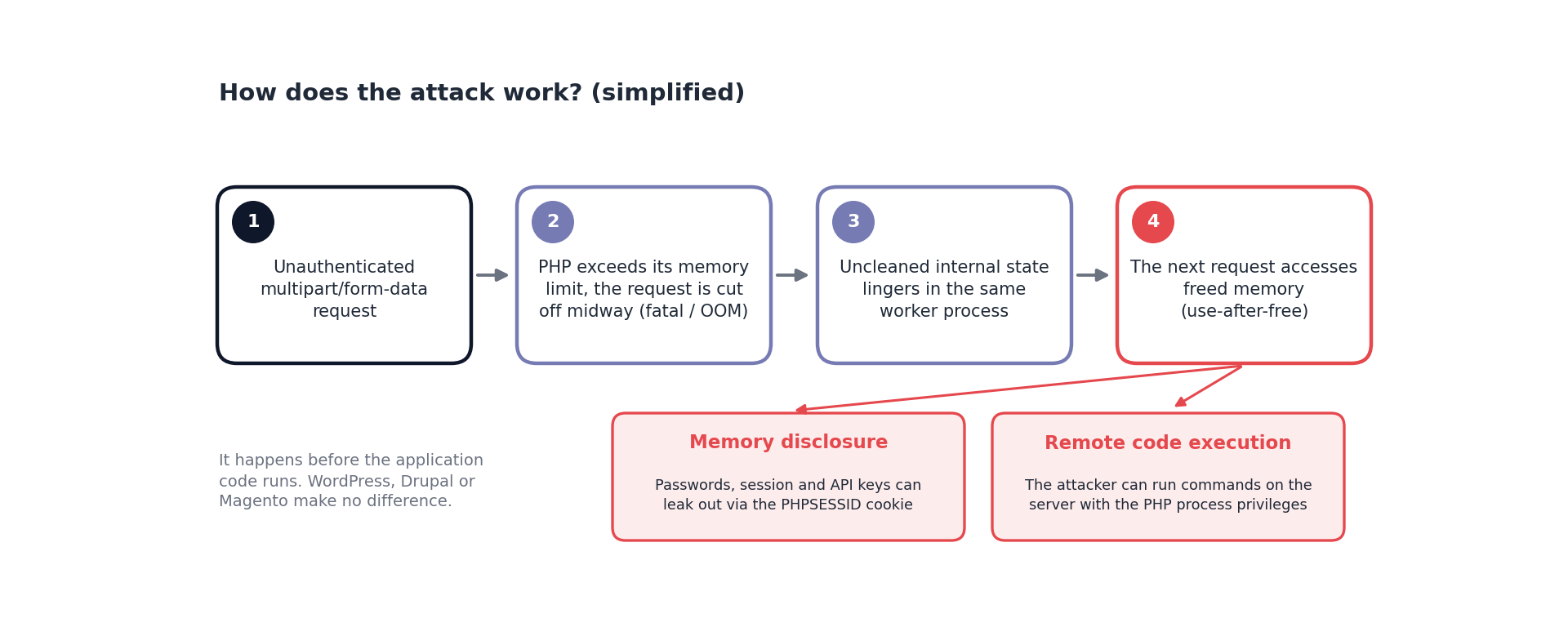
According to Sansec's analysis, all known trigger paths go through multipart/form-data requests, and both Apache mod_php and PHP-FPM are affected with default settings. PHP's own security advisory scopes the risk even more broadly: every setup that responds to web requests, namely PHP-FPM, Apache mod_php, php-cgi, FrankenPHP and LiteSpeed, is at risk. The highest risk is on mod_php, where an exploit has been demonstrated that can be triggered with a single unauthenticated request, without any application code running.
Why is this so serious?
Most web vulnerabilities depend on a particular plugin, a particular framework or carelessly written code. PHP2Shell is different. Because the problem is inside the interpreter, it hardly matters what runs on top of it. Wiz says that even a simple "Hello World" application can be vulnerable on an affected PHP version.
The results shared by the researchers back this up. Wiz announced that it achieved unauthenticated RCE on the official container images of WordPress, Drupal and Joomla. Sansec extended the list: successful exploitation was reported on Magento 2.4.9, WordPress 7.1.2, Drupal 11.4.3, Joomla 6.1.4, MediaWiki, Roundcube, phpMyAdmin, Nextcloud, Laravel 13, Symfony 8.1 and WHMCS. Application-layer security plugins or maintenance modes do not help here, because the attack happens before the application gets its turn.
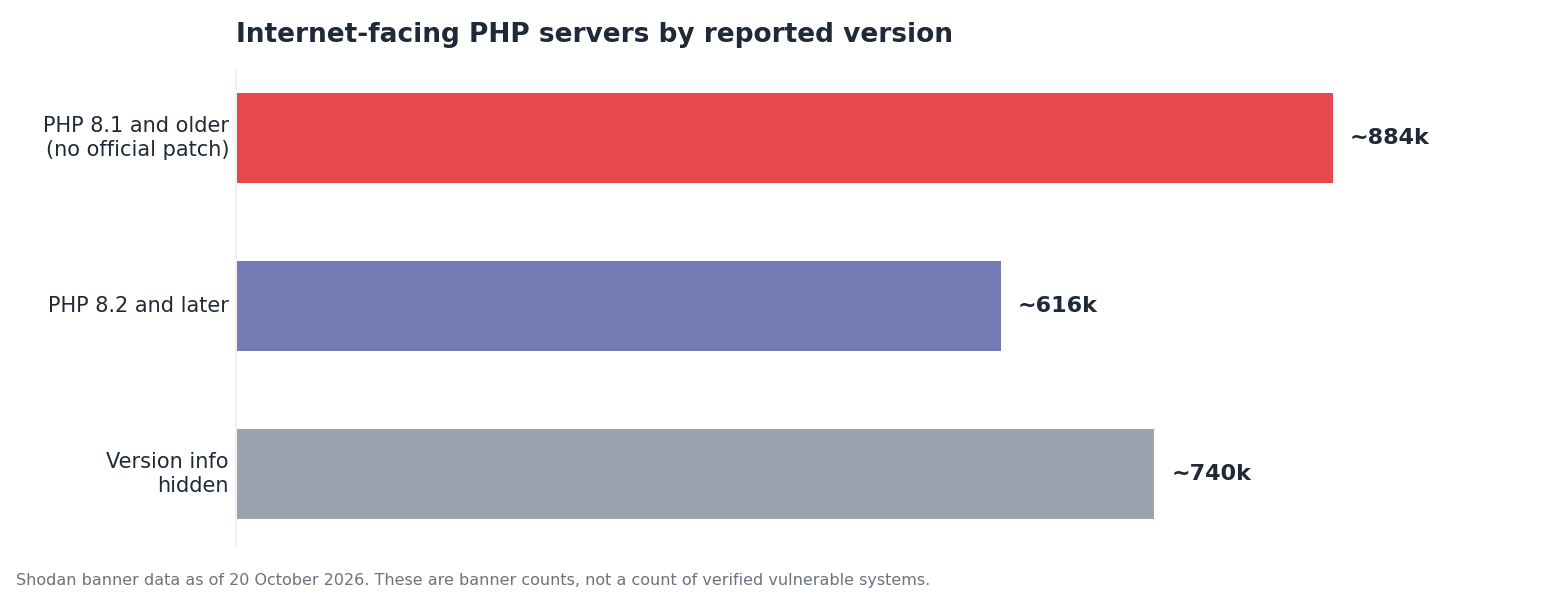
Scale is a separate problem. According to W3Techs, about 69 percent of websites whose server-side language is known use PHP. According to Mallory's Shodan analysis dated 20 October, of roughly 1.5 million internet-facing PHP servers that show version information, 884 thousand, or 59 percent, report version 8.1 or older. These versions will not receive an official patch. Around 740 thousand servers show no version information at all.
The age of the flaws makes things worse. According to Sansec, the code in question was added in PHP 5.4, back in 2012. Wiz also notes that every PHP version released in the last decade carries at least one of these bugs.
Exploitation status
The picture changed quickly, even before the patch was out. Cloudflare CTO Dane Knecht announced that they had started seeing the first attack attempts on the morning of 21 October. According to Sansec, the first attempts were recorded at 07:43 UTC, hours before the official patch. Cloudflare released WAF rules for known attack vectors to all its customers, including the free plan, but describes them as a temporary measure. watchTowr reported that it could reproduce one of the flaws, while Huntress said that, as of that morning, it had not seen confirmed exploitation across its customer base.
A word of caution is in order. It is unclear whether some of the code circulating online as "PHP2Shell exploit" actually works, and Tenable warns that it may contain malware. Exploit code of unknown origin should not be run on corporate systems, even for testing.
History is a good indicator too. For the 2024 PHP-CGI flaw CVE-2024-4577, Akamai saw exploitation attempts within 24 hours of public disclosure. That flaw and the 2019 PHP-FPM flaw CVE-2019-11043 are listed today in CISA's Known Exploited Vulnerabilities catalog, linked to ransomware campaigns. There is good reason to expect PHP2Shell to follow a similar path.
Which versions are affected, and which get a patch?
The PHP team released new versions only for supported branches. The table below summarises the current status:
| Version branch | Fixed version | Status |
|---|---|---|
| 8.6 (development) | 8.6.0 RC4 | Earlier 8.6 builds are affected; move to RC4 or later |
| 8.5 | 8.5.12 | Active support |
| 8.4 | 8.4.27 | Active support |
| 8.3 | 8.3.36 | Security fixes only (until 31 December 2027) |
| 8.2 | 8.2.35 | Security fixes only; support ends on 31 December 2026 |
| 8.1, 8.0, 7.4 | No official release | Backport patches from the PHP team for those building from source, or distribution/LTS vendor patches |
| 7.3 and earlier, 5.x | No official release | Upgrade to a supported version or isolate from the internet |
There is a small but important exception for end-of-life versions. For users who build from source or have no access to an LTS vendor, the PHP security team published minimal backport patches for the 7.4, 8.0 and 8.1 branches. These sit in the php-src repository in branches named PHP-<version>-CVE-2026-109618-109619. Linux distributions and LTS vendors also received the patches in advance, so on systems running Debian, Ubuntu, RHEL or Alpine the relevant distribution's security advisories should be checked. Sansec notes that the popular Remi repository had not yet been updated on release day.
A separate note for systems running 8.2: this branch received the patch today, but it reaches end of life in two months. Since an emergency change window is being opened anyway, the opportunity should also be used to plan the move to 8.4 or 8.5.
What to do today
Take inventory. List servers, container images, CI environments and developer machines. Do not overlook products that ship their own PHP: control panels such as cPanel and Plesk, network appliances and some Windows-based enterprise software are also in scope. The output of
php -von the command line does not always reflect the version running on the web side, because FPM pools and mod_php may use a different binary.Prioritise internet-facing systems. Start with directly reachable web servers, then move on to systems on the internal network.
Update and restart the processes. Installing the new package alone is not enough. If PHP-FPM and Apache services are not restarted, the old code keeps running in memory. In container environments, images should be rebuilt on the new base image and redeployed, and you should check that the tag in use (e.g.
php:8.3-fpm) really points to the updated version.Verify the result. After the update, confirm the running version over the web, that is, with a request actually handled by FPM or mod_php.
Handle end-of-life systems separately. Systems running 8.1 or older should be moved to a supported version or have a distribution backport applied. If neither is possible, the system should be taken off the internet and placed behind a VPN. CERT-EU also recommends isolating internet-facing applications until the patch is applied.
Contact your hosting provider. If you use shared hosting or a managed platform, get written confirmation from the provider of when the update will be applied. WordPress users can see their PHP version under Tools > Site Health > Info > Server.
If the patch cannot be applied right away
PHP's security advisory makes it clear that updating is the only complete fix. Still, it shared some settings that narrow the known attack paths until the patch is applied:
; CVE-2026-109618: remove the PHP memory limit
; (preferably via php_admin_value on the FPM/Apache side)
memory_limit = -1

; Limit the request body size
post_max_size = 8M          ; 32M if file uploads are needed
upload_max_filesize = 7M    ; must stay below post_max_size

; CVE-2026-109619: disable upload progress tracking
session.upload_progress.enabled = 0

; PHP 8.5 only
fatal_error_backtraces = 0
A few points need care when applying these settings. Values should be set directly in php.ini or in FPM pool files, not with ini_set() or .user.ini, and all workers should be restarted after the change. The PHP team specifically says not to rely on operating system limits such as RLIMIT_AS and RLIMIT_DATA. The memory_limit = -1 setting also has a cost: it lets a single request consume all of the server's memory, so it must be combined with request size limits.
A harsher stopgap is to block multipart/form-data requests at the web server level. Since every known trigger path goes through this request type it is effective, but file uploads and some payment forms will stop working. For an e-commerce site, the safest interim option may be to put the site into read-only mode until the patch is applied. Sansec points out that the built-in maintenance modes of Magento and WordPress offer no protection here, because those modes also run on PHP.
WAF rules (Cloudflare, AWS, Akamai, Fastly and others) buy time, but they only protect traffic that passes through that service. If the server can be reached directly by IP, that protection is bypassed.
Monitoring guide for MDR and SOC teams
Patching does not undo a breach that has already happened. Because the first attack attempts began before the official patch, monitoring from now on is not enough; a retrospective threat hunt going back to at least 20 October is needed. No official IOC list (IPs, hashes, signatures) has been published yet, so detection has to be built on behaviour. And because the attack happens below the application layer, application logs will often stay silent. The real visibility will come from web server, PHP process and endpoint telemetry.
Scope and priority first
The first job for MDR teams is to identify internet-facing PHP assets in every monitored environment and tag them by version and patch status. Generic PHP version detection checks in vulnerability scanners (for example Tenable plugins 48243 and 58987) are a good starting point until CVE-specific checks are released. For unpatched, internet-facing systems it makes sense to temporarily lower alert thresholds and route every high-severity alert from these assets straight to an analyst. Tracking customers' patch progress from the same list also records which systems were exposed and for how long.
Visibility: which logs do you need?
Default access logs fall short for this flaw. In their standard format, Nginx and Apache do not record the request body size or the Content-Type header. Adding these two fields, and if possible the response size, to the log format during patching makes it much easier to spot multipart-based attempts. Beyond that, make sure PHP-FPM and Apache error logs, process creation events from EDR or auditd, network data showing the web servers' outbound connections and file integrity monitoring for the web root are all flowing into the SIEM. If a WAF or reverse proxy is in use, logging response headers is almost the only way to see memory disclosure via PHPSESSID.
Detection scenarios
The table below brings together the signals expected at different stages of exploitation. The first four rows cover the attempt and memory disclosure stage; the remaining rows cover the period after a successful breach.
| Signal | Data source | Why it matters |
|---|---|---|
| An "Allowed memory size exhausted" error right after a multipart POST request | Access log + PHP / Apache error log | All known trigger paths follow these two steps |
| Repeated HTTP 500 responses from the same source in a short time | Access log, WAF, reverse proxy | Exploits that rely on memory layout often need several attempts |
| PHP-FPM workers crashing with "exited on signal 11", increased worker respawning | PHP-FPM log, journald, dmesg | A direct sign of memory corruption |
An abnormally long PHPSESSID response cookie, or one containing binary data |
WAF / reverse proxy response logs | The channel through which disclosed memory leaves the server |
| A shell, script interpreter or download tool spawned by a PHP process | EDR, auditd, Sysmon for Linux | The clearest sign of successful code execution |
| Unexpected outbound connections from the web server | Firewall, NetFlow, EDR network telemetry | Reverse shell, C2 or data exfiltration |
| New or modified .php files in the web root | FIM, EDR file events | Persistence via a webshell |
| New cron jobs, systemd services or accounts created as the web user | auditd, EDR, system logs | Persistence and privilege escalation |
Sample Sigma rule
After a successful RCE, the most reliable signal is a process running PHP spawning a shell or a tool. The rule below is written for Linux process creation events and can be converted for the SIEM in use:
title: Shell or tool spawned by a PHP worker process
status: experimental
description: Possible code execution after PHP2Shell (CVE-2026-109618/109619)
logsource:
  category: process_creation
  product: linux
detection:
  selection_parent:
    ParentImage|contains:
      - 'php-fpm'
      - 'php-cgi'
      - 'lsphp'
      - 'frankenphp'
      - '/httpd'
      - '/apache2'
  selection_child:
    Image|endswith:
      - '/sh'
      - '/bash'
      - '/dash'
      - '/python3'
      - '/perl'
      - '/curl'
      - '/wget'
      - '/nc'
      - '/ncat'
      - '/socat'
  condition: selection_parent and selection_child
falsepositives:
  - Legitimate apps calling sendmail, ImageMagick etc. via exec()
level: high
Because some applications legitimately call /bin/sh via exec() or mail(), the normal behaviour of the environment should be observed for a while before the rule is enabled, and exceptions defined accordingly. Huntress has announced that it will share Sigma and YARA rules in its huntresslabs/threat-intel GitHub repository once the technical details are clearer; that repository is worth following.
KQL for Microsoft Defender
In environments using Defender for Endpoint, the same logic can be hunted retrospectively with this query:
DeviceProcessEvents
| where Timestamp > datetime(2026-10-20)
| where InitiatingProcessFileName has_any
    ("php-fpm", "php-cgi", "lsphp", "httpd", "apache2")
| where FileName in~ ("sh", "bash", "dash", "python3", "perl",
    "curl", "wget", "nc", "cmd.exe", "powershell.exe", "certutil.exe")
| project Timestamp, DeviceName, AccountName,
    InitiatingProcessFileName, FileName, ProcessCommandLine
Quick log scan on the server
On servers that have no EDR or do not send logs to a SIEM, the following commands do the job for a first check. Log paths may vary by distribution and PHP version:
# Memory limit errors
grep -E "Allowed memory size of [0-9]+ bytes exhausted" \
  /var/log/php*-fpm.log /var/log/apache2/error.log

# Crashed PHP-FPM workers
grep -E "exited on signal (11|6)" /var/log/php*-fpm.log

# Source IPs of POST requests that returned 500
awk '$6 ~ /POST/ && $9 == 500 {print $1}' /var/log/nginx/access.log \
  | sort | uniq -c | sort -rn | head -20

# PHP files changed in the web root in the last 3 days
find /var/www -name "*.php" -mtime -3 -ls
If command lines show expressions such as /dev/tcp/, mkfifo or base64 -d, or reconnaissance commands such as whoami, id or uname -a run as the web server user, treat it directly as an incident. On Linux servers without EDR, Florian Roth's free process-watcher tool can make such child processes visible; note, however, that the tool only records activity and blocks nothing.
When an alert fires
Isolate the server from the network, but do not shut it down. Memory and running processes have evidential value.
Preserve the web server, PHP-FPM and system logs, together with a memory image if possible.
Inspect the web root for webshells and new files, and check for new cron jobs, systemd services, SSH keys and user accounts.
Extract the external addresses the server connected to, and search the SIEM for communication between those addresses and other assets.
Rebuild the system from a clean image with a patched PHP version. Simply patching a compromised server is not enough.
Finally, do not overlook the possibility of memory disclosure. Because CVE-2026-109618 can leak data without leaving any trace of code execution, on internet-facing systems where the patch was applied late it would be a sensible precaution to rotate database passwords, API keys, application secrets (for example the Laravel APP_KEY or WordPress salt values) and, if necessary, TLS certificates.