In cybersecurity operations (SOC/MDR), we usually focus on endpoints and network traffic. However, the controlled tests we have recently conducted have shown that the industry's leading EDR/XDR solutions (in their default configurations) have a blind spot: code executions performed over the VMware vSphere Guest Operations API.
When a threat actor gains vCenter/ESXi access along with guest operating system (Guest OS) credentials, they can execute commands directly from the hypervisor management plane without leaving any traces over the network (RDP, WinRM, SMB).
In this article, we will examine how this architectural gap behaves specifically with Fortinet FortiEDR, why it goes undetected, and how we can hunt for this threat (Threat Hunting) through the eyes of an MDR analyst.
FortiEDR's Behavior: Why No Alarm Is Raised
FortiEDR has a very strong kernel-level architecture when it comes to blocking known threats and detecting behavioral anomalies. However, the main reason it remains silent in this specific scenario under default settings is not a "product vulnerability" but rather a trust relationship by design.
Trusted Parent: The command is launched on the guest operating system by the legitimate vmtoolsd.exe process, which is digitally signed by VMware. FortiEDR's classification engine (Classification Engine) considers this VMware-signed process as "Trusted" by default.
Absence of Network Activity: The execution takes place not over the network but directly through the VMX/Hypervisor channel. FortiEDR's network-based anomaly rules are not triggered.
Post-Exploitation Expectation: FortiEDR does not immediately label powershell.exe as malicious when it spawns under vmtoolsd.exe. However, if that PowerShell attempts to tamper with memory (LSASS) or exhibits ransomware behavior (file encryption), it blocks at that stage (Post-Exploitation). The issue is that we end up missing this covert execution during the "Initial Access" and "Execution" stages.
How to Detect This on FortiEDR
As MDR teams, we cannot simply wait for the alarms the product generates; proactive threat hunting (Threat Hunting) is essential. To catch this behavior using FortiEDR's "Threat Hunting" module, queries such as the following should be built and then turned into Custom Rules:
Sample FortiEDR Threat Hunting Query:
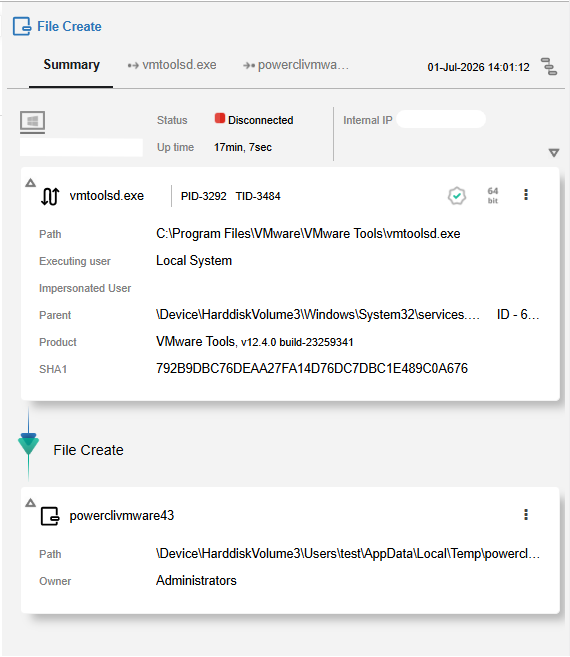
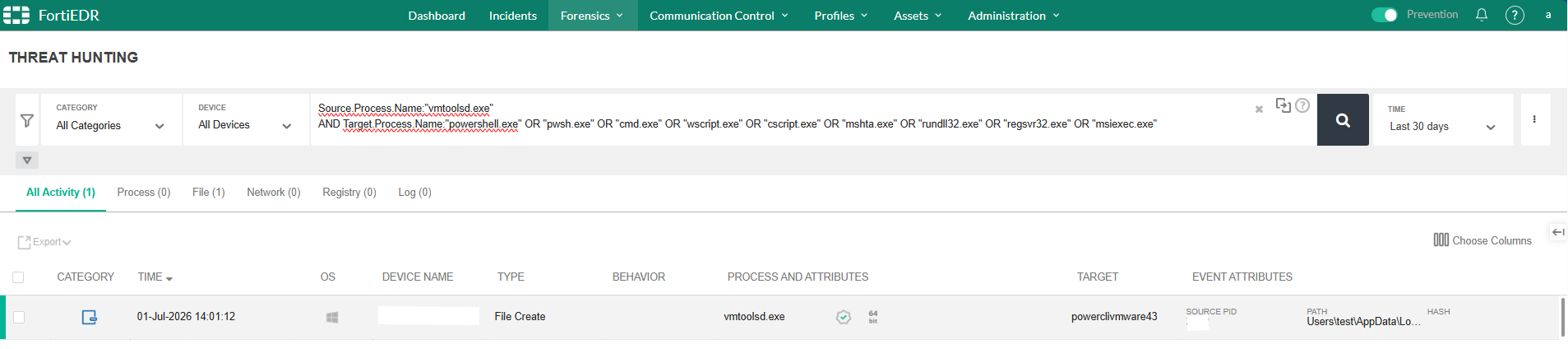
Analysis of the Action and Findings: In the images above, you can clearly see the practical reflection of the hunting scenario we built. When we click into the process tree of one of the events surfaced by the search, the anatomy of the bypass technique is fully revealed. It is clearly detected that vmtoolsd.exe, VMware's legitimate process that runs with the highest privilege on the operating system, "Local System", dropped a suspicious file named powerclivmware43 into the endpoint's temporary (Temp) directory (File Create).
Tuning the Rules and Exceptions: When you run this rule in your environment, the most important point to pay attention to is establishing the organization's normal (Baseline). If your IT teams execute legitimate PowerShell scripts through VMware automation tools such as vRealize, this query will initially hit them as well. The analyst's job here is:
To parse suspicious commands that are obfuscated within process arguments or encoded with Base64,
To identify the environment's legitimate IT automation command sets and define them as an "Exception" to the rule,
To treat all remaining unexpected vmtoolsd.exe child process activities as a potential "System Breach".
How the Vendor (Fortinet) Interprets This Situation
Fortinet and other EDR vendors do not treat this situation as a "Zero-Day" or a vulnerability. The vendor's approach is: "EDR monitors processes within the boundaries of the operating system. If an authorized account is executing commands using a legitimate management tool (VMware Tools), this is an IT operation. In order not to create false positive (False-Positive) fatigue, we do not block these processes by default."
Fortinet recommends that its customers use FortiEDR's "Playbook" and "Custom Rule" features to define their own environment's normal ("Baseline") and to increase visibility through SIEM integration.
What to Watch For (Strengthening the Defense)
Relying solely on FortiEDR is not sufficient against this vector. In line with the "Defense in Depth" principle in cybersecurity, the following points should be observed:
SIEM Correlation Is a Must: vCenter logs must absolutely be forwarded to the SIEM (e.g., FortiSIEM or Splunk). The vSphere API — GuestProcessManager.StartProgramInGuest event should be monitored on the SIEM and, whenever this operation is performed, an alarm should immediately be raised to the SOC team.
vCenter/ESXi Hardening: Ransomware groups are directly targeting virtualization infrastructures. Access to vCenter interfaces must absolutely be protected with MFA and allowed only through "Jump Servers".
Privileged Account Management (PAM): Local administrator (Local Admin) passwords on the guest operating system should be rotated using solutions such as LAPS, so that even if the actor has vCenter access, they get stuck at authentication.
Conclusion
Endpoint security is not a product but a process. "Trusted Parent" abuses can bypass even the most expensive security tools. This is exactly why, in the MDR processes we run at specialized organizations such as Infinitum IT, we do not settle for the products' default settings and continuously write hunting rules (Hunting Rules) against new attack techniques.
Asude Handan USLUKILIÇ — L1 MDR Analyst
InfinitumIT MDR — Detection Engineering & Threat Hunting
This article is based on observations made in a controlled FortiEDR test environment. The Threat Hunting query and recommendations presented are illustrative in nature; they may vary depending on the environment configuration.