Why doesn't Check Point Harmony flag commands arriving via vSphere Guest Operations as alerts? Starting from a lab test, we close the gap step by step with a Threat Hunting query, a Behavioral Protection rule, and a 30-day look-back window.
EDR platforms — under pressure from increasing attack vectors and evolving behavioral techniques — are shifting weight from signature-based detection toward behavior-based detection. Although the abuse of digitally signed and trusted files can generally be caught by these products, blind spots can still appear in certain scenarios. In this article, I will discuss how a Guest Operations scenario executed via vmtoolsd can be detected on the Check Point Harmony Endpoint side.
vmtoolsd is a service that ships with the VMware Tools installation. Its job is to relay commands issued on the hypervisor side down into the guest operating system. It is a signed, legitimate component that is allowed to run almost without question.
But there is another side to this. The moment an attacker takes over the vSphere management side, they use this channel as-is. They don't go over the network, they don't log in; the command runs on the guest OS as SYSTEM. The picture EDR sees is indistinguishable from ordinary management activity.
I will pursue the following three questions: What did a PowerShell invocation launched via Guest Operations leave behind in the Threat Hunting repository? Why did Behavioral Guard stay silent? Which behavioral rule did I add to Custom Rule to close the gap?
Test
A Windows Server 2022 guest. On it, the Harmony Endpoint agent and the default Threat Prevention policy. On the vSphere management side, I ran a script that calls the Guest Operations API: with StartProgramInGuest, powershell.exe -encodedcommand ... was triggered inside the guest OS. The command touched a few system files and exited.
To summarize the result in a single sentence: Harmony collected everything, but produced not a single alert.
What Does Threat Hunting Say?
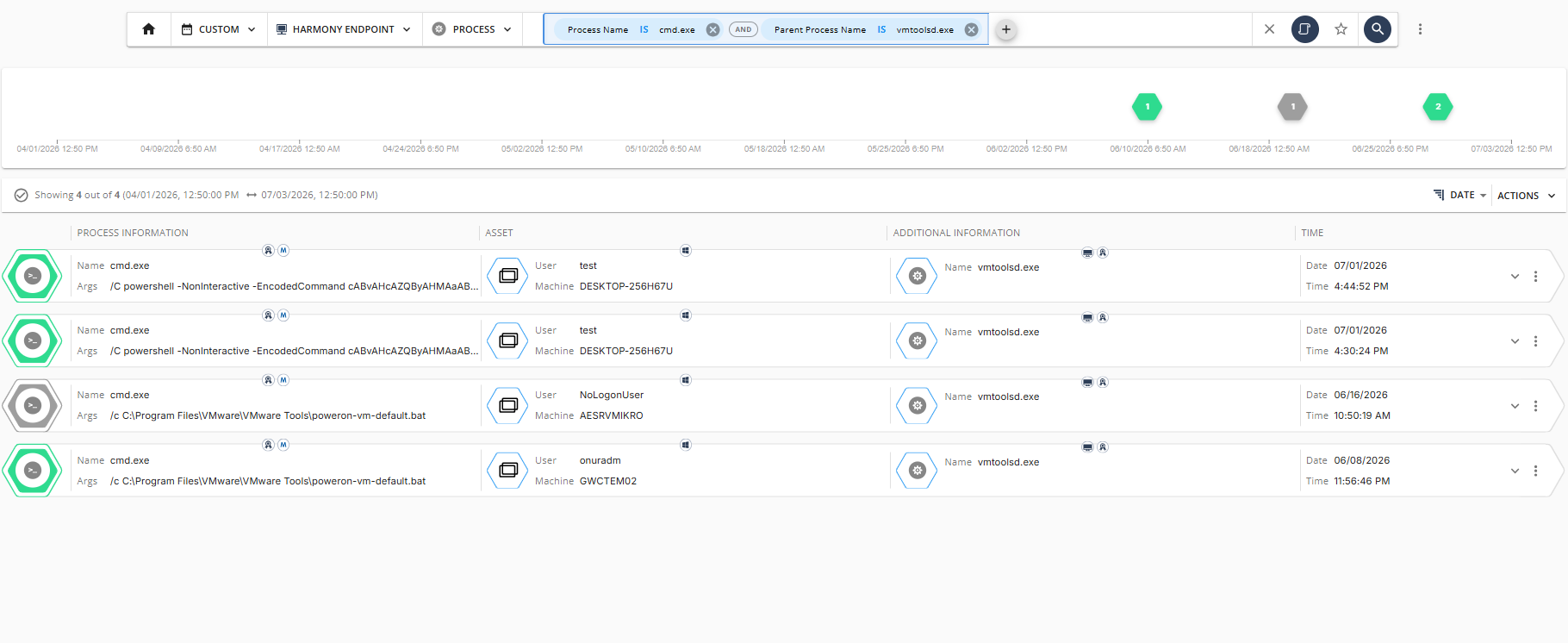
The telemetry pool is full. In the Infinity Portal → Threat Hunting interface, two simple filters surface the event:
Parent Process Name Is vmtoolsd.exe
Process Name Is cmd.exe

Figure 1: Threat Hunting query and result list
In some of the events returned within the selected time range, the parent is vmtoolsd.exe, the child process is cmd.exe, and the command line follows the same pattern: /C powershell -NonInteractive -EncodedCommand .... In other words, the chain is not a single step — vmtoolsd spawns cmd; cmd in turn invokes an encoded PowerShell command. This is the typical trace of commands sent via the Guest Operations API; the EncodedCommand parameter on the command line is the signature of the obfuscation step.
The same list also contains legitimate uses: VMware's own launch scripts such as C:\Program Files\VMware\VMware Tools\poweron-vm-default.bat spawn cmd under vmtoolsd at guest boot. Defining exceptions for such paths brings the rule's FP profile down to an acceptable level.
Process tree, command line, user, file operation — everything is in the record. So there is no lack of signal. The only thing missing is a rule that sticks the "important" label onto that signal.
Why Is Behavioral Guard Silent?
Three structural reasons at the same time:
vmtoolsd is VMware's signed and trusted service. Because the Publisher trust level is high, Behavioral Guard's behavioral scoring stays below the threshold.
The operation arrives via the hypervisor channel. On the network side, there is no connection for Harmony to see, and Anti-Bot does not engage.
No interactive logon has occurred. Logon Type 2/10 records are empty; correlation channels via authentication are also absent.
In short, the vmtoolsd → powershell chain, on its own, does not appear on Harmony's tracking list. It is logged, it is classified, but it is not turned into an alert.
The Rule Needed
Within the Infinity Portal, I added the following behavioral rule under Threat Prevention → Behavioral Protection → Custom Rules. The rule's scope covers cmd, powershell, pwsh, cscript, and wscript processes so as to catch, on its own, the cmd → powershell chain that the test exposed:
There are two caveats here. First, the action starts with Detect. Before switching to Prevent, exceptions must be defined for legitimate uses; VMware's own Toolbox scripts, launch files such as poweron-vm-default.bat, or automation tools like Ansible / Terraform may temporarily use this chain. Second, the rule is not enough on its own — unless it is correlated with the vSphere audit log, every PS invocation on the endpoint side looks equally weighty. A trigger without a Guest Operations event means something entirely different.
Validate Before Saving
Before saving the rule, the same query needs to be run over the last 30 days. The goal: to see how many alerts this rule will generate once it goes live, which endpoints they will come from, and which command-line patterns will be covered. If there are cases that produce FP among them, the rule must be saved only after the necessary adjustments have been made to it.
The Endpoint Rule Isn't Enough — Close the Hypervisor Side Too
The source of the gap is the vSphere management plane. The rule on the endpoint side only sees the outcome part; what is needed is to approach the source as well.
Put vCenter access behind MFA + PAM. Administrator sessions should land on an immutable log channel.
In vSphere RBAC, leave Guest Operations privileges only to the role that actually needs them for business reasons. The fewer roles, the narrower the attack surface.
On the Guest OS side, PowerShell Constrained Language Mode should be active. On top of it, an AppLocker or WDAC layer.
Script Block Logging, Module Logging, Transcription — all three active at once, with logs flowing over a channel that reaches a central SIEM.
Review the Behavioral Protection exceptions on the Harmony side. Broad exceptions based on signer alone are dangerous; no exception should be published without the trio of path + hash + signer.
Ömer Kaan Kurt — L1 MDR Analyst
InfinitumIT MDR — Detection Engineering & Threat Hunting
This article is based on the results of a test and rule simulation performed in a real EDR environment.